

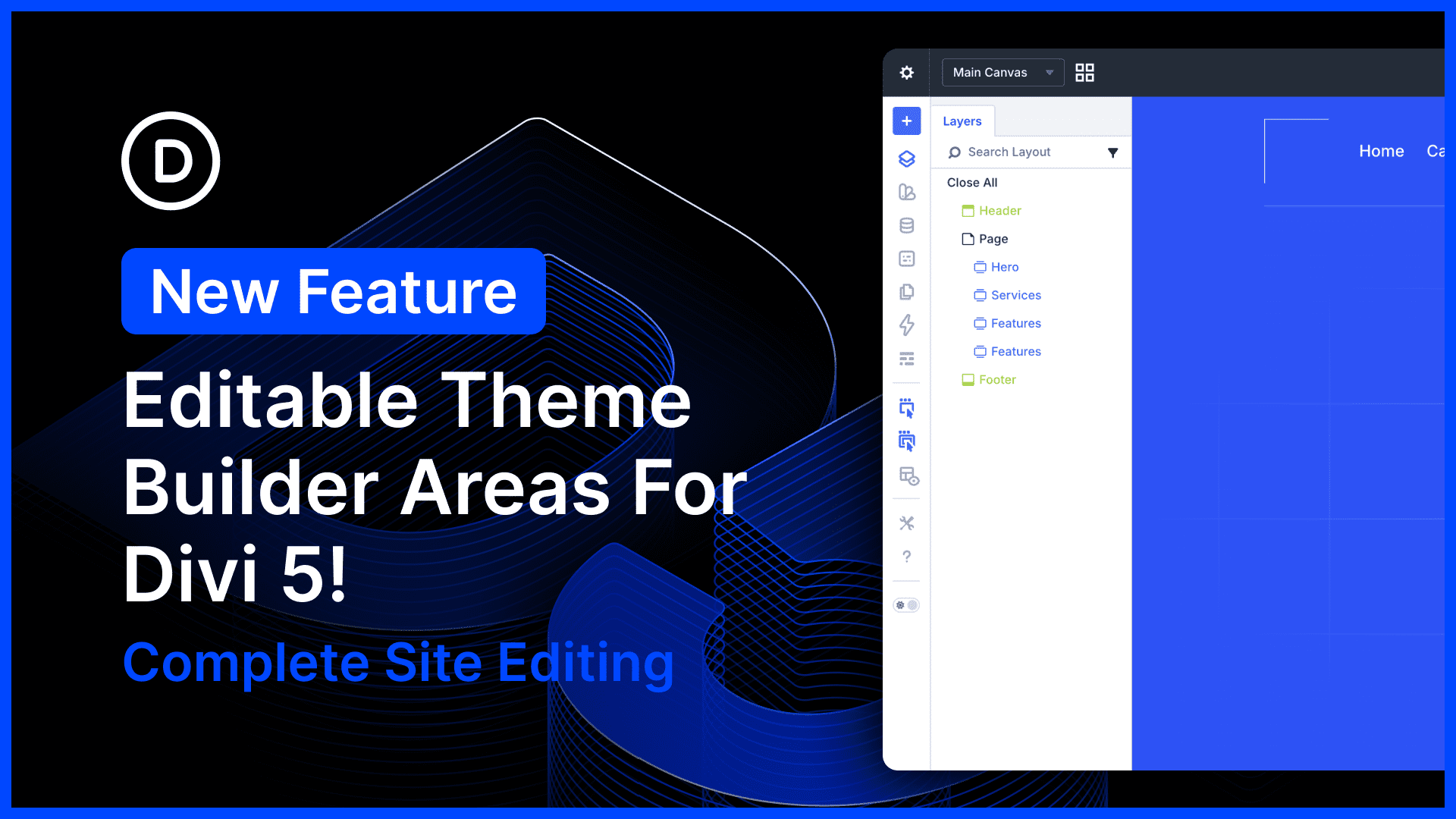
Divi 5 now supports complete site editing in the builder, allowing you to edit your header, footer, body layouts, and page content at once.
Your entire site, from top to bottom, can be edited in a single step. You don’t have to exit to the Theme Builder. It’s really convenient and saves a ton of time!
There’s much to explore, so let me jump into the builder and give you the full, off-the-cuff tour. 👇
Complete Site Front-End Editing
Divi is more than a page builder; it’s a site builder. You can design your entire site from top to bottom, including customer headers, footers, product templates, category templates, and everything else.
These structural areas, typically hard-coded into WordPress themes, can be handcrafted in Divi using the Theme Builder, which lets you create dynamic templates with Divi’s full suite of modules and design settings.
Now, you can edit all of those Theme Builder templates on the front end without visiting the Theme Builder! No matter where you are on your website, you can click the “Edit With Divi Button” to jump into the builder and edit content or templates associated with that part of your site in a single editing session.
Enjoy Seamless Editing Between All Areas
Divi 5’s implementation of complete site editing is special and superior to Divi 4 because it allows you to edit all Theme Builder areas seamlessly, without having to “activate” each area one at a time.
You can interact with the entire site, and even copy, paste, drag, and drop between areas seamlessly!
Edit Everything On The Front End, Not Just Pages
Previously, the Edit With Divi button was only available for singular posts, like pages, products, and blog posts.
Now that Theme Builder areas are editable on the front end, the Edit With Divi button is always available on every part of your website.
You can always hop into the builder and edit whatever Theme Builder templates you assigned to that part of your website.
Easily Turn It Off For Your Clients To Protect Global Templates
It’s easy to turn off this new feature. If you don’t want to see your header, body, or footer templates while editing posts and pages, you can disable them in the builder settings.
Furthermore, you can use the Divi Role Editor to restrict Theme Builder access for your clients, preventing them from editing Theme Builder templates in the builder and accidentally messing up global layouts.
Try Divi 5 Today
Complete site editing is now available for Divi 5. Give it a try and let us know your thoughts.
We rebuilt Divi from the ground up and packed it full of dozens of your most requested features. Forget everything you thought you knew about Divi, because Divi 5 is an entirely different beast.
Have You Tried Speculative Prerendering for Divi 5?
In case you missed it, we recently released Speculative Prerendering for Divi 5.
We want the Divi 5 building experience to be fast, faster than any other builder. The only thing faster than fast is instant, and with speculative prerendering, that’s exactly what you get. Instant load times when entering, exiting, and switching pages in the builder.
For Divi Pros who spend all day bouncing in and out of the builder, this quality-of-life improvement really adds up.
Watch this video for all the details. 👇
More Divi 5 Updates Are On The Way
The features keep coming, and we aren’t slowing down anytime soon!
If you are enjoying these updates, do us a huge favor and let us know by liking this video and leaving a comment. It means a lot to us to see you cheering Divi on, and it’s essential to feed the algorithm and spread the word.
Don’t forget to follow us on YouTube and subscribe to the Divi newsletter so you never miss an update. I’ll see you soon for another Divi 5 feature announcement, which I promise will be right around the corner. 😁










I have encountered an error in Divi 5 – the responsive breakpoints do not work for the background video in the section/row.
Hopefully this will be fixed in the next update.
Please make sure you report these things via our customer support team so they can get validated and triaged quickly.
Awesome Nick!!
It’s great to see the header and footer in the main builder canvas again, but is there a way to detect fixed to nav headers so that when logged in they aren’t tucked in under the Word press admin bar. There are styling hacks for this using the .logged-in class but now that offsets in the builder with a gap at the top, probably 32px for the admin bar height.
There alternative is sticky but from experience there is a cosmetic shudder on initial scroll in Safari, not so bad in Chrome.
finally this was missing since day one of the alpha, and asked for it, as it was simply a show stopper for using divi5 for us.
not that not everything could be done, but would adjust the workflow drastically. Glad this is now finally added. Well done!
This is a big upgrade. Editing header, footer, and pages in one flow saves a lot of time. Divi 5 is finally feeling like a full site builder, not just a page builder 👍